Direct answer
Can we actually block vibe-coded apps?
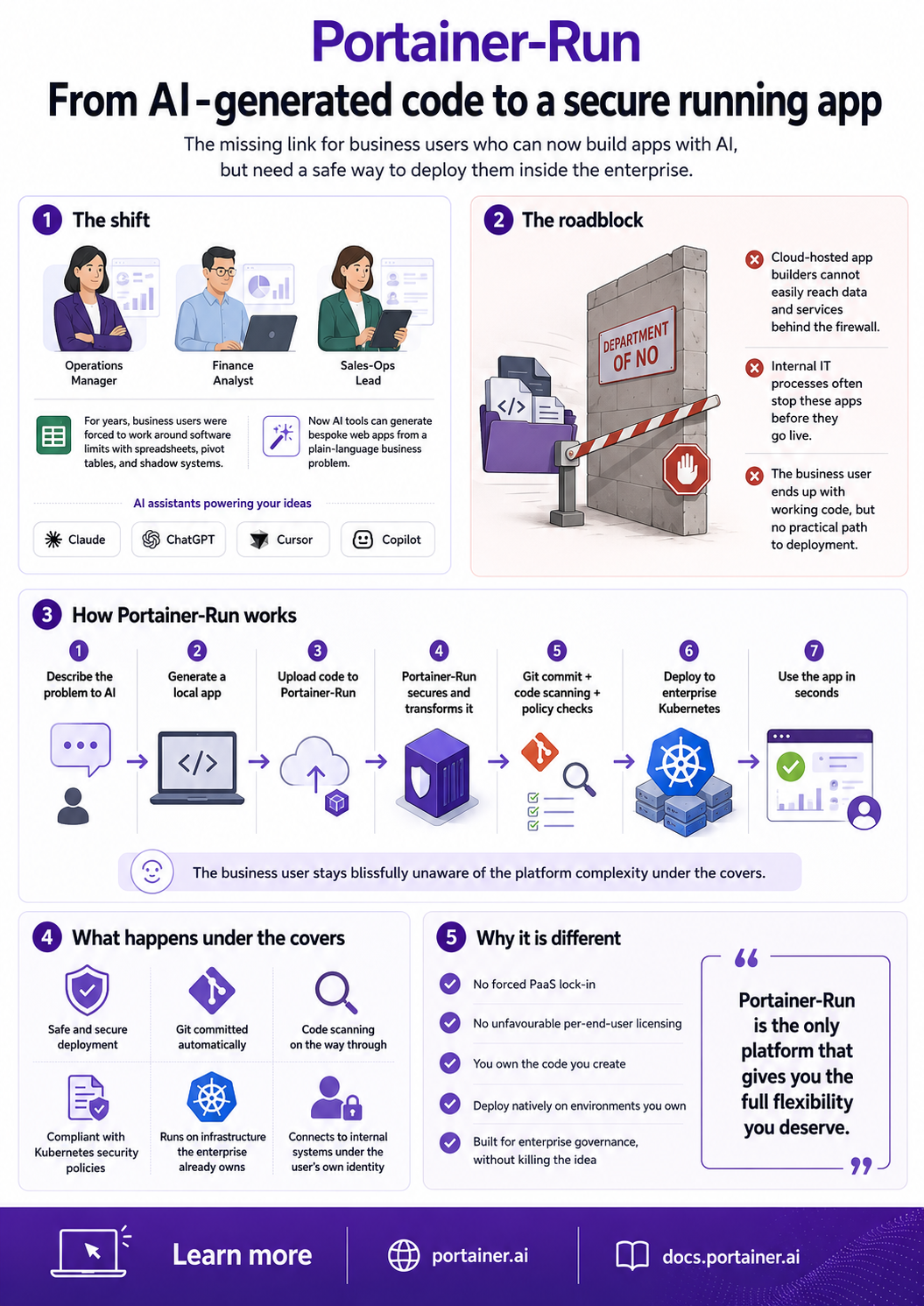
Not in any way that holds. A ban moves the activity onto tools and clouds you cannot see, so the control that works is a sanctioned, secured place to run. You govern these apps by giving them somewhere governed to go, which is exactly what Portainer-Run is.
Direct answer
How do we discover the ones already running?
Every app deployed through Run passes one governed pipeline and carries the identity that deployed it, so the inventory is complete by construction rather than reconstructed after the fact. For apps already stood up outside, the offramp brings them into that same inventory.
Direct answer
Is our data leaking to the AI app provider?
It can be, when an app runs on a provider's cloud and reaches back for your data to do its job. Apps deployed through Run run on your own clusters and your own infrastructure, so the app and its data stay inside your environment.
Direct answer
Do business users get access to our clusters?
No. They connect through Portainer under their own identity, bound entirely by your Portainer RBAC role. They never receive a kubeconfig or direct cluster access.
Direct answer
Does our data leave our environment?
No. Apps run on your own clusters and your own infrastructure, including on-prem and air-gapped. Portainer-Run is the control plane that places them there, not a hosting service.
Direct answer
Does this work in regulated or air-gapped environments?
Yes. Portainer Business runs in regulated, distributed, and air-gapped environments. The cluster API stays off the network perimeter throughout.
Direct answer
Is there an audit trail, and can we roll back?
Yes. Every deployment is committed to your Git repo, giving you a full version history. You can roll back to any previous version in one click from Portainer Business.
Direct answer
How is each app locked down at runtime?
Every app deploys hardened by default. Containers run unprivileged with all Linux capabilities dropped and privilege escalation disabled, under the RuntimeDefault seccomp profile, and no Kubernetes service account token is mounted. Each app also carries sensible resource requests and limits, so nothing runs unbounded.
Direct answer
Who can reach a deployed app?
Only the internal users you choose. We recommend and fully support Pomerium as the in-cluster ingress, configured to pre-authenticate access to each app, so a deployed app is reachable only by authenticated internal users and never open on the network by default.
Governing the motion
Can we actually block vibe-coded apps?
Not in any way that holds. A policy that says no does not stop the work; it moves it onto personal accounts, unmanaged tools, and outside clouds you cannot see, which is the opposite of control. The approach that works is to give these apps a sanctioned, secured place to run inside your environment, so the activity comes to a surface you govern rather than going further out of view. Portainer-Run is that place.
How do we discover the vibe-coded apps already running?
For anything deployed through Run, discovery is not a hunt: every app passes one governed pipeline, carries the identity of whoever deployed it, and is defined in your Git repo, so the inventory is complete by construction. For apps your people already stood up outside, the offramp is how you bring them in, at which point they join the same complete inventory as everything else.
Is company data leaking to the AI app provider?
It can be, and this is the exposure most worth closing. An app that runs on a provider's cloud and reaches back into your systems for data moves that data across your boundary every time it runs. Apps deployed through Run run on your own clusters, on your own infrastructure, including on-prem and air-gapped, so the app and its data stay inside your environment and there is no provider in the path to leak to.
Access and authorization
Do business users get access to our clusters?
No. They connect through Portainer with a personal access token, and everything they can do is bound by your Portainer RBAC role. They never get a kubeconfig or direct cluster access. Portainer is the gateway, and it deploys on their behalf.
Who can deploy where?
Deployments are scoped by environment and namespace, and access is governed by Portainer Business RBAC, so a builder can only deploy into the space you have granted.
Can a security or platform lead see every app that has been deployed?
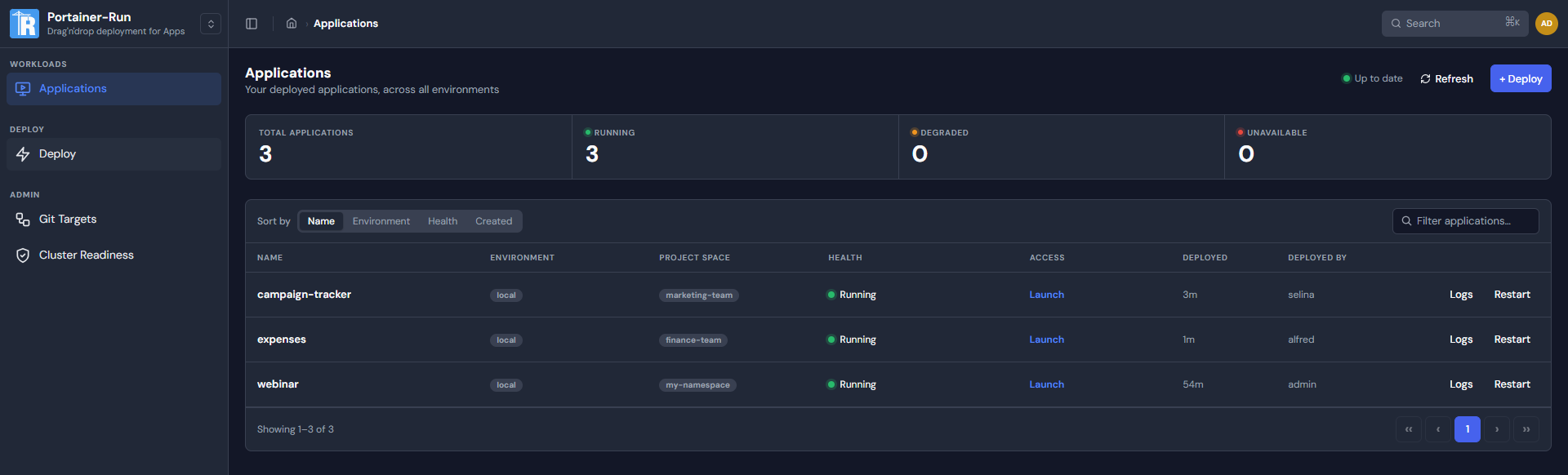
Yes. An administrator sees every app deployed through Run in one place, regardless of who deployed it, and each app's manifest and source also live in your Git repo. The only way in is the governed pipeline, so the inventory is complete by construction and there is no shadow deployment to find after the fact.
Who owns each app, and is there a record of who deployed it?
Every deployment is made under the Portainer identity that triggered it, so you know who deployed what, and the app and its history live in your Git repo. Nothing reaches the cluster anonymously.
Who can reach a deployed app once it is running?
Only the internal users you allow. We recommend and fully support Pomerium as the in-cluster ingress for Run apps, configured to pre-authenticate every request to each app. Nothing an AI builder deploys is exposed openly on the network by default, and access is bound to authenticated internal users through the identity provider you already run.
Code integrity and supply chain
How do we stop unsafe code from being deployed in the first place?
Every artifact commits to your sanctioned repo, where your scanning and secret detection run, and the cluster's admission controllers reject anything that does not meet policy before it starts. The gate is yours.
We have a lot of builders. Do we vet each app's controls one by one?
No. IT configures a shared Git target once, with your code scanning and policy enforcement on it, and every app deployed against that target inherits those controls automatically. You set the gate a single time and it applies to every builder who uses the target, with no per-app trust decision.
How are the git credentials handled?
The token for the source repo is stored as a Kubernetes Secret and injected into the clone step by reference, so it never appears in the deployment spec or on any command line.
How does the app get from Git onto the cluster?
Portainer Business reconciles the manifest from your repo as a GitOps stack and polls for changes on a set interval. Before the container starts, three init containers run in sequence: the first clones the committed source from Git into a persistent volume, the second installs dependencies with the package manager for the detected runtime (npm, pip, and so on) inside the runtime image, and the third writes a .env file from the values entered at deploy. There is no image build and no registry in the path.
Runtime control
Where do these apps actually run?
Only in the clusters and namespaces IT designates. You define the deployment space, and nothing lands outside it.
How is each app hardened at the container level?
Every app deploys to the Kubernetes baseline pod security profile by default. Containers run unprivileged, with all Linux capabilities dropped, privilege escalation disabled, and the RuntimeDefault seccomp profile pinned. The pod does not mount a Kubernetes service account token, so a deployed app has no ambient credentials to the cluster API. These controls are written into the committed manifest, so they are visible and auditable in your Git repo rather than applied invisibly.
How do we cap what an app can consume?
Every app is deployed with sensible resource requests and limits already applied, so nothing runs unbounded even before you add namespace policy. Apps also deploy into namespaces you control, where you set resource quotas of your own, so a runaway app is bounded by the same Kubernetes controls you already use. Because the requests and limits live in the committed manifest, a platform administrator can tune them in Git for a workload that genuinely needs more.
Once an app is running, what can it reach?
Only what you allow. Apps deploy into dedicated namespaces which you can pre-configure with network policies, and even zero-trust networking.
How do we monitor a running app and shut it down if needed?
You see each app's status and logs in Portainer and can stop or roll one back at once. Because these are ordinary Kubernetes workloads, your existing runtime monitoring applies to them too.
Can someone change a running app without going through Git?
Updates take the same path as the first deploy. The change is committed to Git and Portainer Business reconciles it from there, so the running state always tracks the repo. That removes out-of-band drift and means every deployment, first or hundredth, is fully repeatable.
Operations and lifecycle
What happens when the builder who made an app leaves?
The app does not depend on them. It is standard source in Git running as a standard Kubernetes deployment, owned by the platform rather than the person. Deploy access is governed by Portainer RBAC, so a leaver or role change is handled by your normal identity process, and the running apps are unaffected and can be reassigned.
How do we retire apps and stop sprawl?
Every app is visible in one place and defined in Git, so retiring one is deliberate: remove it and its manifest leaves the repo and the workload leaves the cluster. You always hold the full inventory, so nothing becomes an untracked zombie.
These are AI-generated apps. How do we support and maintain them?
Each one is standard source and a standard Kubernetes deployment, versioned in your Git repo and running on a platform your team already operates. There is no proprietary runtime to learn. You review, update, roll back, and hand off a Run app the same way you would any other Git-backed workload.
Data and compliance
Does our data leave our environment?
No. Apps run on your own clusters, on your own infrastructure, including on-prem and air-gapped. The app and its data stay inside your environment. Run is the control plane that places them there, not a hosting service that takes your data elsewhere.
Does this work in regulated or air-gapped environments?
Yes. Portainer Business runs in regulated, distributed, and air-gapped environments, and the cluster API stays off the network perimeter.
Is there an audit trail, and can we roll back?
Yes. Every deployment is committed to your Git repo, so you have a full version history, and you can roll back to a previous version in one click.